Install the Kit
Add the kit to a site in a CMS or to a web app. Either way you pin one exact version, and nothing changes until you move to a newer one.
CMS Sites
A university-provided CMS site already has CMU's template, so you only have to add the
kit's files: cmu-cms.css in the head of every page, after the template's
stylesheet and before the site's own, if it has one, so the site's styles take
priority. Components labeled Script also use cmu-app.js, loaded just
before </body>. Keep the comment above each line, so whoever
changes versions later can find the kit's lines among the site's other code.
In Cascade
Cascade adds code to every page from text blocks that the site's
setup block lists under Additional Code, each at a location: In Head
or Before Closing Body. Keep one block for each location, holding everything the
site adds there: the kit, the site's own stylesheet, analytics.
-
In the site's top folder, choose Add Content ›
Block › Text Block. Name it
head-includes, check Advanced editor, paste the kit's lines and save it:<!-- Carnegie Mellon Web Kilt --> <link href="https://cdn.jsdelivr.net/gh/cmu-web/cmu-web-kilt@0.6.8/css/cmu-cms.css" integrity="sha384-9jhXiuuhmbvQJYP71Rg8e7/NBlfXA/7MjHSMxZeSbELc/fdpt3PAwyoS4jvEMXqy" crossorigin="anonymous" media="screen" rel="stylesheet" type="text/css"/> <!-- Optional: Bootstrap Icons, for components labeled Icons --> <link href="https://cdn.jsdelivr.net/npm/bootstrap-icons@1.13.1/font/bootstrap-icons.min.css" integrity="sha384-CK2SzKma4jA5H/MXDUU7i1TqZlCFaD4T01vtyDFvPlD97JQyS+IsSh1nI2EFbpyk" crossorigin="anonymous" rel="stylesheet" type="text/css"/>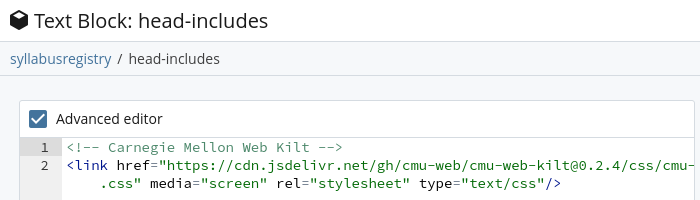
-
For components labeled Script, make a second text block,
body-end-includes, the same way:<!-- Carnegie Mellon Web Kilt --> <script src="https://cdn.jsdelivr.net/gh/cmu-web/cmu-web-kilt@0.6.8/js/cmu-app.js" integrity="sha384-10393F76wEQPHaJEEoM9M1QEQsl9mTezDdEM45kArp0j26SWs3gxiGsXKrmwJHio" crossorigin="anonymous"></script>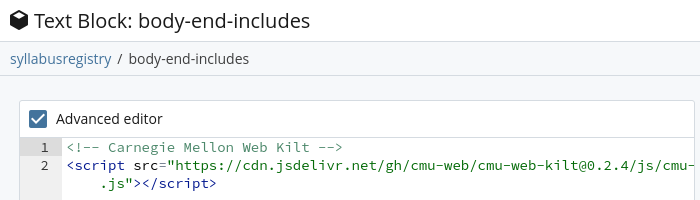
-
Open the site's
setupblock and select Edit. Near the end, set Additional Code to Yes. Add a Code item for each block:head-includesat In Head, andbody-end-includesat Before Closing Body. Save it.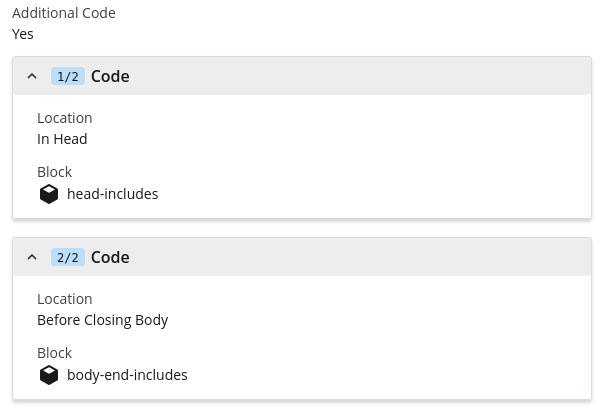
-
Preview a page to check, then publish the site's pages, which pick up the
setupblock's code when they're published. - From then on, paste components into any page's content section, in its Source code view. Find a Component
In Another CMS
In Drupal or another CMS on CMU's template, add the kit's lines where the theme adds code to every page, usually the theme's page template or a setting for extra code. If you don't manage the theme, ask whoever does.
In the head, after the template's stylesheet:
<!-- Carnegie Mellon Web Kilt -->
<link href="https://cdn.jsdelivr.net/gh/cmu-web/cmu-web-kilt@0.6.8/css/cmu-cms.css" integrity="sha384-9jhXiuuhmbvQJYP71Rg8e7/NBlfXA/7MjHSMxZeSbELc/fdpt3PAwyoS4jvEMXqy" crossorigin="anonymous" media="screen" rel="stylesheet" type="text/css"/>
<!-- Optional: Bootstrap Icons, for components labeled Icons -->
<link href="https://cdn.jsdelivr.net/npm/bootstrap-icons@1.13.1/font/bootstrap-icons.min.css" integrity="sha384-CK2SzKma4jA5H/MXDUU7i1TqZlCFaD4T01vtyDFvPlD97JQyS+IsSh1nI2EFbpyk" crossorigin="anonymous" rel="stylesheet" type="text/css"/>
In order to use components labeled Script, you'll also need to include this just
before
</body>:
<!-- Carnegie Mellon Web Kilt -->
<script src="https://cdn.jsdelivr.net/gh/cmu-web/cmu-web-kilt@0.6.8/js/cmu-app.js" integrity="sha384-10393F76wEQPHaJEEoM9M1QEQsl9mTezDdEM45kArp0j26SWs3gxiGsXKrmwJHio" crossorigin="anonymous"></script>
Paste components into a page's HTML source. Keep a separate, site-specific
stylesheet for anything particular to the site. We don't recommend overriding
cmu- classes there; if a component doesn't fit, ask for a change to
the kit. Try a new version on staging before you publish.
Web Apps
A web app builds its own pages on CMU's template: it loads the template's font, stylesheets and scripts, both of the kit's stylesheets and the kit's script, and wraps each page in the template's header and footer. Start from The Whole Page, which has all of it. Keep your own copy of a release in the app, so it doesn't depend on jsDelivr being up.
Load the files in this order:
<head>
  <!-- CMU's template -->
  <link href="https://fonts.googleapis.com/css?family=Open+Sans:300,300italic,400,400italic,600,700,700italic" rel="stylesheet">
  <link href="https://www.cmu.edu/common/standard-v6/css/main.6.7.min.css" media="screen" rel="stylesheet">
  <link href="https://www.cmu.edu/common/standard-v6/css/print.min.css" media="print" rel="stylesheet">
  <link href="https://www.cmu.edu/favicon.ico" rel="icon">
  <link href="https://www.cmu.edu/favicon-152.png" rel="apple-touch-icon-precomposed">
  <meta content="#9f0000" name="msapplication-TileColor">
  <meta content="https://www.cmu.edu/favicon-144.png" name="msapplication-TileImage">
  <!-- Carnegie Mellon Web Kilt -->
  <link href="/vendor/cmu-web-kilt-0.6.8/css/cmu-cms.css" rel="stylesheet">
  <link href="/vendor/cmu-web-kilt-0.6.8/css/cmu-app.css" rel="stylesheet">
  <!-- Optional: Bootstrap Icons, for components labeled Icons -->
  <link href="https://cdn.jsdelivr.net/npm/bootstrap-icons@1.13.1/font/bootstrap-icons.min.css" integrity="sha384-CK2SzKma4jA5H/MXDUU7i1TqZlCFaD4T01vtyDFvPlD97JQyS+IsSh1nI2EFbpyk" crossorigin="anonymous" rel="stylesheet">
  <!-- Your app -->
  <link href="/css/your-app.css" rel="stylesheet">
</head>
<body class="cmu-app">

  <!-- The template's header, your page, the template's footer -->

  <script src="https://www.cmu.edu/common/standard-v6/js/list.min.js"></script>
  <script src="https://www.cmu.edu/common/standard-v6/js/jquery-1.10.1.min.js"></script>
  <script src="https://www.cmu.edu/common/standard-v6/js/main.6.7.min.js"></script>
  <script src="/vendor/cmu-web-kilt-0.6.8/js/cmu-app.js"></script>
</body>
Use <link> tags, not @import, which loads files one at
a time. Give <body> the class cmu-app. A page shown
inside another tool, such as a Canvas LTI frame, has no CMU header or footer; give it
cmu-framed instead, which also pads the page.
To keep your own copy, copy a release's files into your app's static folder, with the version in the folder name so it's obvious which one you have, and commit them:
V=0.6.8
D=static/vendor/cmu-web-kilt-$V
mkdir -p $D/css $D/js
for f in css/cmu-cms.css css/cmu-app.css js/cmu-app.js; do
  curl -fsSL "https://cdn.jsdelivr.net/gh/cmu-web/cmu-web-kilt@$V/$f" -o "$D/$f"
done- Don't edit the copied files. A newer release replaces them.
-
Keep your own styles separate, in an application-specific
stylesheet. We don't recommend overriding
cmu-classes there; if a component doesn't fit, ask for a change to the kit. - Choose a release and move to newer ones as Versions describes.
Pick your stack for where the kit's files go. Each component's Framework tab has what that component takes in React, Svelte, Vue, Rails or Django.
Prototypes
For a mockup or a one-off page, link everything from the CDN. It's the quickest way to start, but the page depends on jsDelivr. Copy the header and footer from The Whole Page.
<head>
  <link href="https://fonts.googleapis.com/css?family=Open+Sans:300,300italic,400,400italic,600,700,700italic" rel="stylesheet">
  <link href="https://www.cmu.edu/common/standard-v6/css/main.6.7.min.css" rel="stylesheet">
  <link href="https://www.cmu.edu/favicon.ico" rel="icon">
  <link href="https://www.cmu.edu/favicon-152.png" rel="apple-touch-icon-precomposed">
  <meta content="#9f0000" name="msapplication-TileColor">
  <meta content="https://www.cmu.edu/favicon-144.png" name="msapplication-TileImage">
  <link href="https://cdn.jsdelivr.net/gh/cmu-web/cmu-web-kilt@0.6.8/css/cmu-cms.css" integrity="sha384-9jhXiuuhmbvQJYP71Rg8e7/NBlfXA/7MjHSMxZeSbELc/fdpt3PAwyoS4jvEMXqy" crossorigin="anonymous" rel="stylesheet">
  <link href="https://cdn.jsdelivr.net/gh/cmu-web/cmu-web-kilt@0.6.8/css/cmu-app.css" integrity="sha384-Tj5sbg6foKwNHx77Xj9uSKHv4N7jiYnj97prQWE3B2+6v3K8tsqz/xmsjxeJKvjA" crossorigin="anonymous" rel="stylesheet">
  <!-- Optional: Bootstrap Icons, for components labeled Icons -->
  <link href="https://cdn.jsdelivr.net/npm/bootstrap-icons@1.13.1/font/bootstrap-icons.min.css" integrity="sha384-CK2SzKma4jA5H/MXDUU7i1TqZlCFaD4T01vtyDFvPlD97JQyS+IsSh1nI2EFbpyk" crossorigin="anonymous" rel="stylesheet">
</head>
<body class="cmu-app">

  <!-- The template's header, your page, the template's footer -->

  <script src="https://www.cmu.edu/common/standard-v6/js/list.min.js"></script>
  <script src="https://www.cmu.edu/common/standard-v6/js/jquery-1.10.1.min.js"></script>
  <script src="https://www.cmu.edu/common/standard-v6/js/main.6.7.min.js"></script>
  <script src="https://cdn.jsdelivr.net/gh/cmu-web/cmu-web-kilt@0.6.8/js/cmu-app.js" integrity="sha384-10393F76wEQPHaJEEoM9M1QEQsl9mTezDdEM45kArp0j26SWs3gxiGsXKrmwJHio" crossorigin="anonymous"></script>
</body>
Versions
Each release is a git tag, such as 0.2.7, listed on the
releases page, and
jsDelivr serves every tag's files at a fixed address.
-
Always pin an exact version. An address with a version range
(
@0) or none at all changes under you when a new release comes out. -
Copy each CDN line whole. Its
integrityvalue matches that release's file exactly, so the browser refuses a file that's been changed. When you move to a new version, replace the whole line, not just the number. - Versions follow semver. A patch (0.2.1) fixes things, a minor version (0.3.0) adds things, and a major version (1.0.0) can rename or remove classes.
Moving to a New Version
- Read the release notes on the releases page. For a major version, they list every renamed or removed class.
-
Change the version: replace the kit's lines in your CMS's head code (in Cascade, the
head-includesandbody-end-includesblocks) with the new release's, copied whole from this page; or change it inpackage.json(thennpm install), or in your copied folder's name and your layout's links. - Check your pages, on staging for a CMS site, before you publish or deploy.
File Inventory
Each component's labels on the Components page say which of these it uses.
| File | Load It On | What It Does |
|---|---|---|
CMU's template: main.6.7.min.css, main.6.7.min.js and
the rest
|
Every page, first. A university-provided CMS site already has it; an app adds it (see Web Apps) | Page structure, type, buttons, links and the components labeled Template |
cmu-cms.css |
CMS sites and apps, after the template's stylesheet | Styles for components labeled CMS, and the kit's colors |
cmu-app.css |
Apps, after cmu-cms.css |
Styles for components labeled App: forms, tables with actions, dialogs and other controls |
cmu-app.js |
Pages with components labeled Script, after the template's scripts | Behavior for components labeled Script |
bootstrap-icons.min.css |
Pages with components labeled Icons, after the kit's stylesheets | The icons, from Bootstrap Icons, an optional library that isn't part of the kit |